It is 4:40 p.m. in a Nkumba networking lab. The Packet Tracer topology looks fine: two switches, student PCs on both sides, a trunk between the switches. VLAN 10 can ping VLAN 10. VLAN 20 can ping VLAN 20. Cross-VLAN traffic fails, and half the group is ready to rebuild from scratch.
I have watched this scene as a lecturer and as a consultant who later walks into Kampala offices with the same symptoms on live Catalyst gear. The fix is rarely “buy a new switch.” It is understanding broadcast domains, access versus trunk ports, and how IEEE 802.1Q tags travel. This guide walks a beginner through that story with a worked Packet Tracer style configuration you can finish today.
Why a flat LAN hurts a campus or SME
On a flat Layer 2 network, every broadcast reaches every port in the domain. ARP requests, discovery chatter, and misbehaving endpoints all share the same interrupt load. In a MUBS BBC lab with crowded benches, that noise is annoying. In a clinic or SACCO branch with IP phones and guest Wi-Fi on the same VLAN, it becomes a security and performance problem.
VLANs split one physical switch into separate logical broadcast domains. Staff laptops can sit on VLAN 10, servers on VLAN 20, and guests on VLAN 30, even when the cables share one closet. Cisco documents this model and the configuration steps in the Catalyst VLAN guides, for example Configuring VLANs on Catalyst 9300 (IOS XE 17.15).
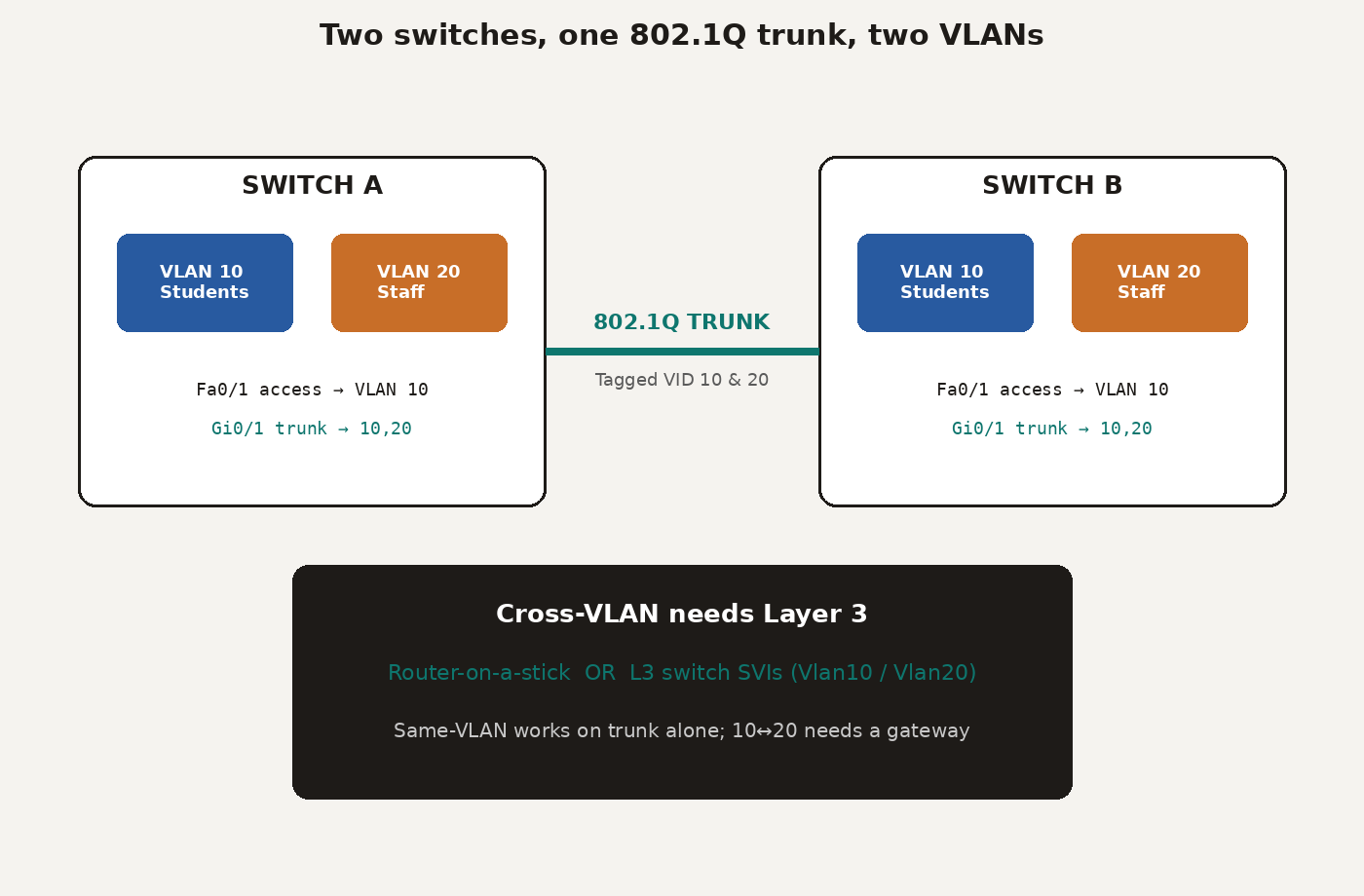
Access ports versus trunk ports
Remember two port jobs before you type anything.
Access port: belongs to one VLAN. End devices see ordinary untagged Ethernet frames. PCs, printers, and most phones connect here.
Trunk port: carries multiple VLANs between switches or to a router. Frames on the trunk gain a 4-byte IEEE 802.1Q tag so the far end knows which VLAN they belong to. Cisco’s trunk chapter for modern Catalyst software is here: Configuring VLAN Trunks.
Students mix these roles constantly. Putting a PC on a trunk without understanding native VLANs, or forgetting to allow a VLAN on the trunk, produces “my cable is fine but ping fails” tickets. Mark that on your lab sheet before you blame the patch cord.
What the 802.1Q tag actually carries
When a frame enters a trunk, the switch inserts a tag after the source MAC. The fields you need as a beginner:
TPID (16 bits): set to 0x8100 for 802.1Q.
PCP (3 bits): Class of Service hint for QoS.
DEI (1 bit): drop eligibility under congestion.
VID (12 bits): VLAN ID from 1 to 4094.
You do not configure those bit fields by hand in Packet Tracer. You do configure which VLANs are allowed, which VLAN is native, and whether the port is truly in trunk mode. Understanding the tag explains why a trunk can multiplex many VLANs on one fibre or copper uplink between building switches.
Worked example: student and staff VLANs in Packet Tracer
Scenario: Switch A and Switch B serve a small teaching block. VLAN 10 is Students. VLAN 20 is Staff. Fa0/1 on each switch is an access port for a PC. GigabitEthernet0/1 is the trunk between switches. We will also note how inter-VLAN routing must appear later.
! On SwitchA and SwitchB
Switch# configure terminal
Switch(config)# vlan 10
Switch(config-vlan)# name Students
Switch(config-vlan)# vlan 20
Switch(config-vlan)# name Staff
Switch(config-vlan)# exit

Switch(config)# interface FastEthernet0/1
Switch(config-if)# switchport mode access
Switch(config-if)# switchport access vlan 10
Switch(config-if)# no shutdown
Switch(config-if)# exit

Switch(config)# interface GigabitEthernet0/1
Switch(config-if)# switchport mode trunk
Switch(config-if)# switchport trunk allowed vlan 10,20
Switch(config-if)# no shutdown
Switch(config-if)# end
Switch# show vlan brief
Switch# show interfaces trunk
On older models you may still see switchport trunk encapsulation dot1q before mode trunk. Many Packet Tracer multilayer images and modern Catalyst IOS XE trunks default to 802.1Q, matching the Cisco trunk documentation linked above. Always verify with show interfaces trunk.
Give PC-Student 192.168.10.10/24 with gateway 192.168.10.1, and PC-Staff 192.168.20.10/24 with gateway 192.168.20.1. Same-VLAN pings should work across the trunk once both access ports and the allowed list are correct.
Inter-VLAN routing: why VLAN 10 still cannot reach VLAN 20
VLANs are separate broadcast domains. Layer 2 alone will not route between them. You need Layer 3:
Router-on-a-stick: one physical router interface with subinterfaces such as
GigabitEthernet0/0.10andGigabitEthernet0/0.20, each with an 802.1Q encapsulation and an IP address that becomes the default gateway for that VLAN.Layer 3 switch SVIs:
interface Vlan10andinterface Vlan20with IP addresses, plusip routingenabled. Hardware switching is faster and common in campus cores.
In class I start with router-on-a-stick because students can see the subinterfaces. In consulting work for Kampala SMEs I push for SVIs on a multilayer switch when budget allows, because the single router uplink becomes a bottleneck during backups and scanning windows.
If same-VLAN traffic works and cross-VLAN fails, do not rebuild VLANs first. Check the gateway IP on the PC, then the SVI or subinterface status, then routing. The same two-way thinking from my static route return-path article applies once Layer 3 enters the picture.
Diagnostics I make every BBC group run aloud
Write these in the back of the lab book:
show vlan brief, is the access port listed under the intended VLAN?show interfaces trunk, is the link trunking, and is the VLAN allowed?show interfaces status, connected or notconnect before you theorise.Ping same VLAN across the trunk, then ping the gateway, then ping the other VLAN.
When I mark Nkumba practicals, students who narrate those four checks aloud almost always find their own mistake. Students who rebuild the whole .pkt file usually reintroduce the same trunk allowed-list error.
Kampala design habits that transfer from the lab
On real small networks around Kampala I keep beginner-safe habits:
Separate guest Wi-Fi from staff data VLANs.
Keep management on its own VLAN with tight ACLs.
Document VLAN IDs on a wall sheet in the rack. Future you will thank present you during a power restoration.
Do not use VLAN 1 for user data if you can avoid it. Leave it for defaults and clean the access ports onto named VLANs.
Those habits start in Packet Tracer. They pay rent when you support a school, church office, or startup floor.
Same-day takeaway
Before you leave the lab or your home desk:
Build two switches, two PCs, one trunk in Packet Tracer.
Create VLAN 10 and 20, assign one access port each, allow both on the trunk.
Prove same-VLAN connectivity with screenshots of
show vlan briefand a successful ping.Add a router-on-a-stick or L3 SVIs and prove one cross-VLAN ping.
Break the trunk allowed list on purpose, watch it fail, then fix it. That failure is the lesson.
If you are sequencing CCNA study, pair this lab with the 90-day CCNA plan. VLANs are not decoration. They are how you keep student traffic, staff traffic, and guest traffic from sharing one messy broadcast domain on a Tuesday afternoon in Kampala.