Every semester at MUBS, a few Applied Computing students ask me the same question after the first OSPF lab: "Can I pass CCNA in three months while still attending lectures?" The honest answer is yes, if you treat it like a course unit with labs, not like a YouTube binge. I also teach routing and switching concepts at Nkumba, and I have coached working helpdesk staff in Kampala who study after shift. The plan below is what I give them: ninety days, about two focused hours a day, Packet Tracer on a modest laptop, and no fantasy about buying a full rack of used Catalysts from an auction site.
The exam is Cisco Certified Network Associate, exam code 200-301. Cisco publishes the official blueprint and weighting on the certification page. Read that page yourself; do not trust a random PDF from a Telegram group. Start here: Cisco CCNA 200-301 exam overview.
What the 200-301 blueprint actually weights
You are not studying "networking in general." You are studying six domains with unequal marks. Build your calendar around the weights, not around whichever chapter feels fun:
Network Fundamentals (20%): models, cabling, IPv4/IPv6, wireless basics, virtualization and cloud at a CCNA depth.
Network Access (20%): VLANs, 802.1Q trunks, Rapid PVST+, EtherChannel (LACP), WLAN building blocks.
IP Connectivity (25%): routing table fields, static routes, floating statics, single-area OSPFv2. This is the heaviest slice.
IP Services (10%): NAT/PAT, NTP, DHCP, DNS ideas, SNMP, syslog, SSH.
Security Fundamentals (15%): ACLs, port security, DHCP snooping and DAI at overview level, wireless security ideas.
Automation and Programmability (10%): controller-based ideas, REST, JSON, configuration management awareness.
When a static route "is in the table" but ping still fails, the bug is often the missing return path. I wrote a full walkthrough of that exact lab failure here: Cisco Static Route Not Working? Fix the Missing Return Route. If VLANs and trunks still feel fuzzy, use Understanding VLANs and Trunking before you drown in STP timers.
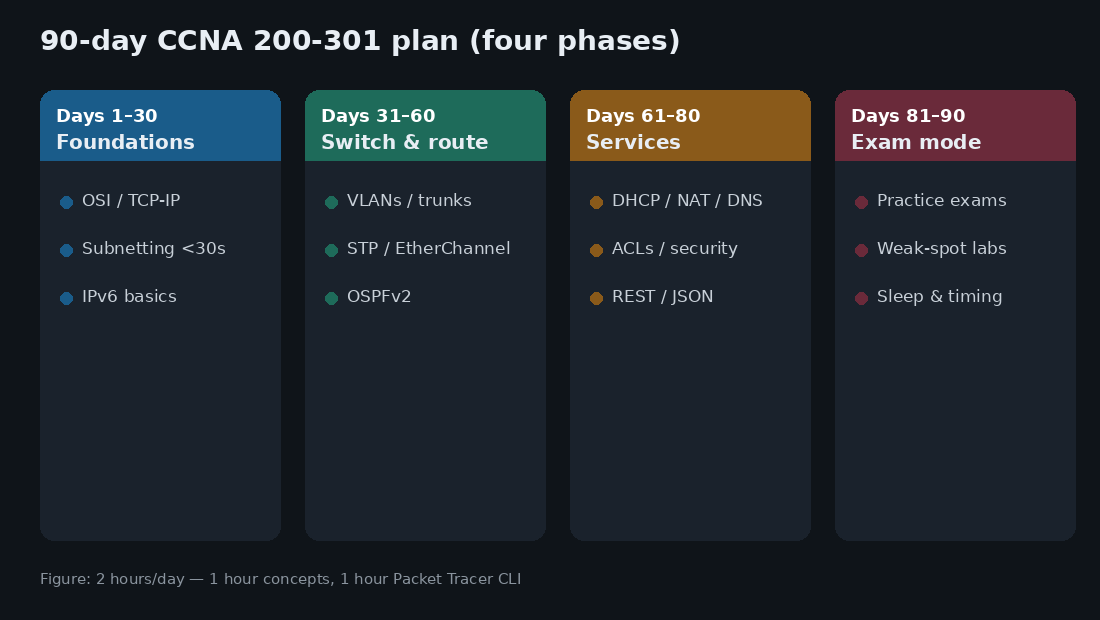
Days 1-30: foundations and subnetting under pressure
Month one is not about looking busy in Packet Tracer. It is about fluency with addressing and the TCP/IP story so the later labs make sense.
Week structure
Hour 1 (concepts): one topic from fundamentals. Take notes in your own words. If you cannot explain it to a classmate without the slide, you do not know it yet.
Hour 2 (drill): subnetting problems on paper, then a tiny Packet Tracer topology that uses the addresses you just calculated.
Subnetting is still where many Ugandan candidates bleed time. There is no calculator in the exam room. I teach the magic-number method in class until it is muscle memory.
Example: 192.168.10.138/27
1. Mask in 4th octet for /27 = 224
2. Block size = 256 - 224 = 32
3. Multiples: 0, 32, 64, 96, 128, 160, ...
4. 138 sits in the 128 block
   Network:   192.168.10.128
   First host: 192.168.10.129
   Last host:  192.168.10.158
   Broadcast: 192.168.10.159
Do twenty problems every morning for two weeks. Aim for under thirty seconds, then under twenty. Paper drills beat phone apps when the exam is on a locked-down workstation. Also cover IPv6 addressing ideas early: you do not need to be an IPv6 designer, but you must read an address and know what a link-local is.
By day 30 you should be able to:
Draw the OSI and TCP/IP models and place DHCP, DNS, HTTP, and ARP in the right conversations.
Subnet any /24 through /30 without blinking.
Build a two-router, two-PC topology and ping across a static route in both directions.
Days 31-60: switching and routing (where the marks are)
This is the core. IP Connectivity alone is a quarter of the exam. Network Access is another fifth. In my labs I insist on CLI, not only the Packet Tracer GUI drag-and-drop.
Switching block
! Access port in VLAN 20
Switch(config)# vlan 20
Switch(config-vlan)# name STUDENTS
Switch(config)# interface fa0/10
Switch(config-if)# switchport mode access
Switch(config-if)# switchport access vlan 20

! Trunk toward another switch
Switch(config)# interface gi0/1
Switch(config-if)# switchport mode trunk
Switch(config-if)# switchport trunk native vlan 99
Then prove it:
Switch# show vlan brief
Switch# show interfaces trunk
Switch# show spanning-tree vlan 20
Learn why a port is blocking, not just how to make the icon turn green. EtherChannel with LACP appears often enough that you should configure it once with mismatched mode on purpose, break it, then fix it.
Routing block
R1(config)# ip route 192.168.20.0 255.255.255.0 10.0.0.2
R2(config)# ip route 192.168.10.0 255.255.255.0 10.0.0.1

R1# show ip route static
R1# ping 192.168.20.10 source 192.168.10.1
That source keyword matters. Without it, students ping from a connected interface address that the far router already knows, and they falsely conclude the static design is complete. For OSPFv2 single area:
R1(config)# router ospf 1
R1(config-router)# network 10.0.0.0 0.0.0.3 area 0
R1(config-router)# network 192.168.10.0 0.0.0.255 area 0
R1# show ip ospf neighbor
R1# show ip route ospf
Memorising the output of show ip route is useless. Understanding administrative distance, metric, and next hop is what the simulation questions test.
Days 61-80: services, ACLs, and a little automation
This stretch feels scattered, so keep a checklist. Configure PAT on a border router. Put a standard ACL on the correct interface in the correct direction (in versus out still confuses people in week ten). Enable SSH on a switch and kill telnet. Read a tiny JSON blob and map it to a REST idea; you do not need to become a developer, but you must not freeze when the question shows curly braces.
! Example PAT overload
R1(config)# access-list 1 permit 192.168.10.0 0.0.0.255
R1(config)# ip nat inside source list 1 interface gi0/0 overload
R1(config)# interface gi0/1
R1(config-if)# ip nat inside
R1(config)# interface gi0/0
R1(config-if)# ip nat outside
Security fundamentals here should connect to how you think on a real job: least privilege on ACLs, port security on access ports, and why DHCP snooping exists. If you later sit IS audit modules, the same control stories appear in evidence collection. See Phase 1 of an IS Audit: How to Plan the Work Properly for how auditors talk about network controls without turning the CCNA into an audit exam.
Days 81-90: practice exams and weak-spot triage
Stop collecting new random topics. Sit timed practice exams. Boson ExSim is widely used by serious candidates; whatever bank you choose, treat it as a diagnostic, not a memorisation sheet. After each exam:
List every miss by blueprint domain.
Build a 30-minute Packet Tracer lab that forces that skill.
Retake only after you can configure and explain, not after you recognised the question wording.
Sleep. Eat. On exam day, flag long sims and return if needed. Watch the clock the way you watch a practical CAT at MUBS: unfinished perfect thinking scores zero.
Labs: Packet Tracer first, fancy emulators later
Cisco Packet Tracer is enough for CCNA 200-301. Download it through NetAcad. GNS3 or EVE-NG with real IOS images is optional enrichment, not a requirement. In Kampala, power and bandwidth are real constraints. A light Packet Tracer topology that you fully understand beats a heavy emulator you barely finish loading before the generator cuts.
Hardware racks are wonderful if your campus has them. They are not an excuse to delay study for three months while you hunt for used 2900s.
A weekly rhythm that survives real life
Mon-Fri: 2 hours (concept + lab).
Saturday: 3 hours mixed review and one full mini-topology from scratch.
Sunday: lighter review or catch-up; protect one rest block so you do not burn out in week six.
Working candidates often do 05:30-06:30 before traffic into town, then one hour after supper. Students often do better in the library than on a phone in a WhatsApp group that claims to share tips and mostly shares dumps.
Key takeaways
Build the ninety days around the official 200-301 weights, especially IP Connectivity and Network Access.
Subnetting speed and two-way static routing are non-negotiable early wins.
CLI labs beat passive video. Explain every field in
show ip routeandshow spanning-tree.Last ten days are for timed practice and weak spots, not new rabbit holes.
Use Packet Tracer well; buy hardware only if it helps you, not because a forum said real gear or nothing.
If you follow this calendar with honest labs, ninety days is enough. If you only watch playlists, ninety days becomes nine months. I would rather you configure a broken return route on purpose, fix it, and remember it for the exam and for the first night shift where a branch office cannot reach head office.