Not every client will let you install CaseWare IDEA, and not every audit team has a licence. Excel is on every machine. Used with discipline, it can test whole populations, not samples, and give you evidence that stands up in the exit meeting. This guide runs a full engagement on the fictional Kampala Trading Co. Ltd in Excel, from a finished plan to written findings. Every formula uses the real field names in the practice datasets, so you can follow along line by line.
If you prefer IDEA, the same tests are in my IDEA guide for IT general and application controls. The data is the same, so you can compare tools.
1. Engagement brief
| Item | Detail |
|---|---|
| Client | Kampala Trading Co. Ltd (fictional), a distributor with offices in Kampala, Gulu and Mbarara |
| Engagement | IT general controls and key application controls review |
| Period | 1 January to 31 December 2025. As-at date for ages: 31 December 2025 |
| Systems | ERP (finance, procurement, payroll), HRMS, file and email servers, web portal |
| Objectives | Confirm access, change, backup, incident, logging and patching controls, and the payment, purchasing, payroll and vendor controls in the ERP |
| Approach | Full-population testing in Excel on system extracts, then follow-up with management |
2. Planning: already done
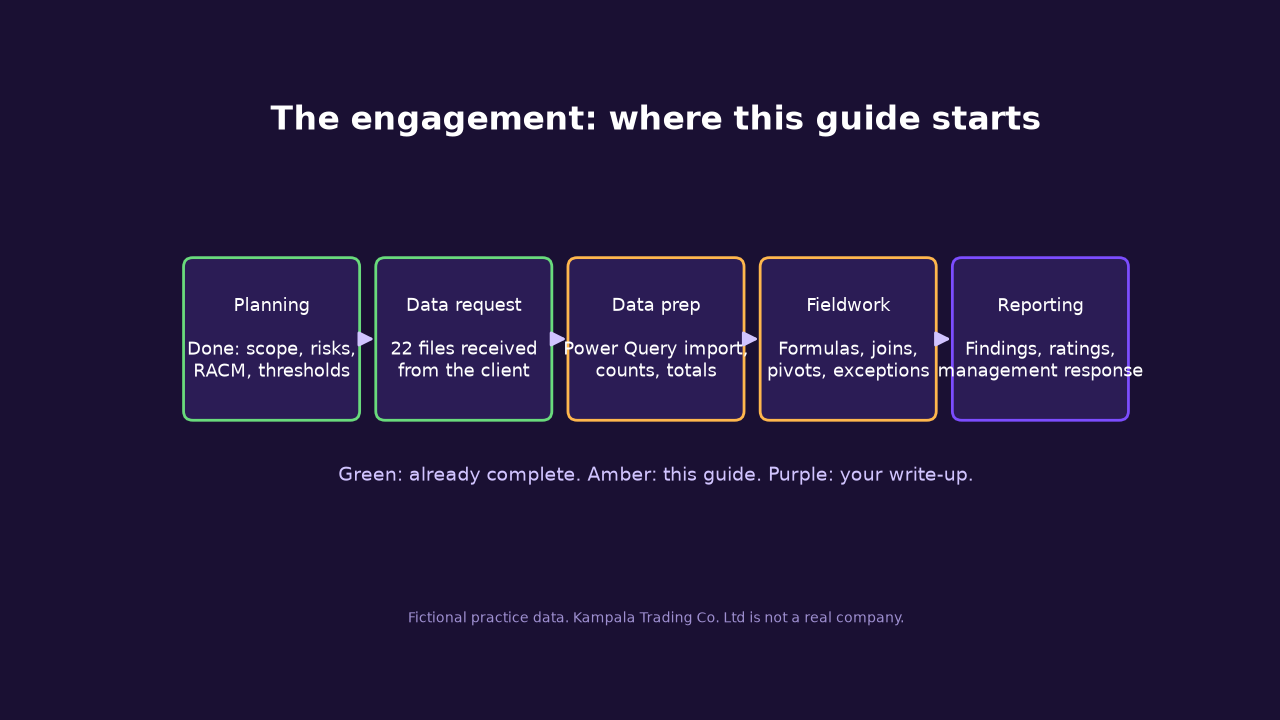
The planning work follows Phase 1 of my IS audit series. Fieldwork is Phase 2, and reporting is Phase 3. Here is what the plan gives you.
Planning memo summary
- Prior year: two findings on leavers and self-approved payments, both "agreed, to be fixed by June 2025".
- Management told us the ERP enforces maker-checker. We test that claim, we do not trust it.
- The client provided 22 extracts with record counts and control totals (control_totals).
- Key contacts: Head of IT, Finance Manager, HR Manager. Fieldwork three weeks.
Thresholds agreed in planning
| Item | Threshold |
|---|---|
| Password age | More than 90 days |
| Dormant account | No login for more than 90 days |
| Leaver revocation | Disabled within 7 days of termination |
| Approval limits | Per approver, in approver_limits |
| Large off-hours posting | UGX 20 million or more at weekends or before 06:00 / from 20:00 |
| Near-limit band | UGX 9.5 million to just under 10 million |
| Critical patches | Within 30 days of release |
| Reconciliation | Difference above UGX 1 million needs explanation |
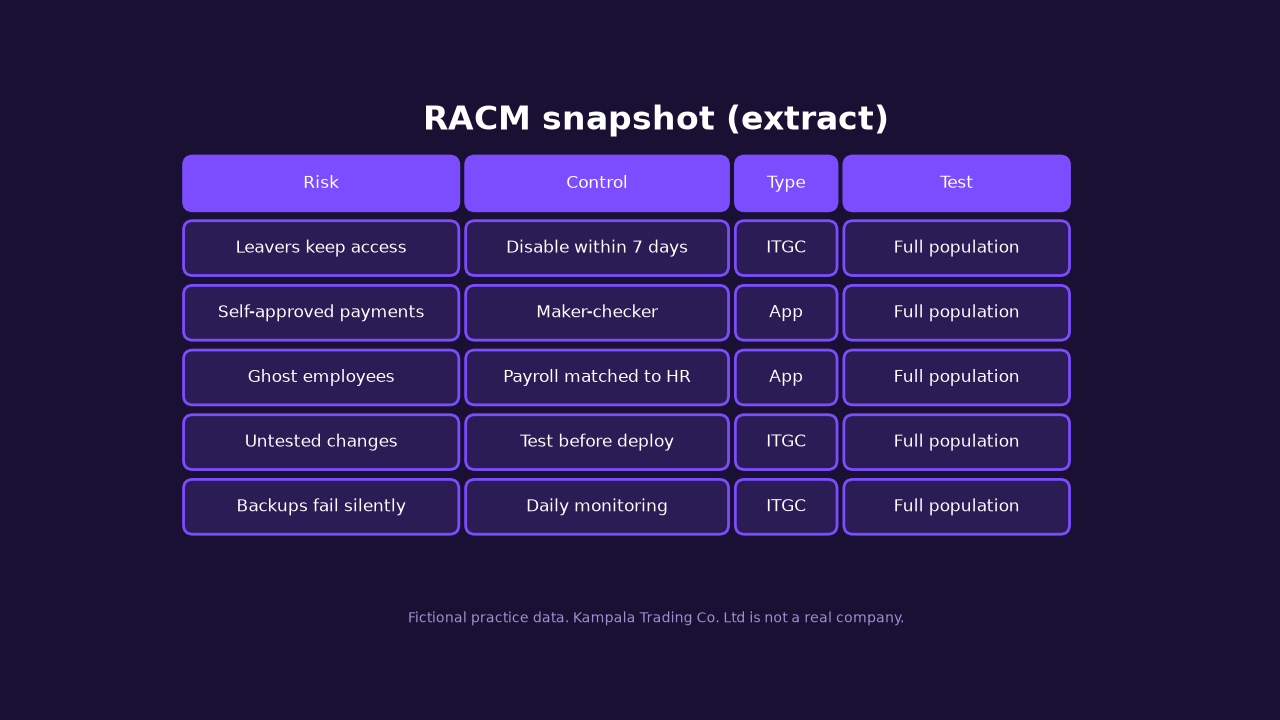
Risk assessment and RACM
| Risk | Control | Type | Test approach | Population |
|---|---|---|---|---|
| Leavers keep access | Disable within 7 days | ITGC | Join HR to users | Full |
| Unused accounts misused | Dormant review | ITGC | Age of last login | Full |
| Weak passwords | 90-day policy | ITGC | Age of last change | Full |
| Toxic role combinations | SoD matrix | ITGC | Role pairs per user | Full |
| Untested changes in production | Approve, test, separate deploy | ITGC | Change log checks | Full |
| No restore point | Daily backups | ITGC | Calendar gap check | Full |
| Unauthorised payments | Maker-checker and limits | App | Voucher rules | Full |
| Paying for goods not received | Three-way match | App | PO, GRN, invoice join | Full |
| Ghost employees | Payroll matched to HR | App | Payroll to HR join | Full |
| Payment diversion | Vendor bank change approval | App | Changes then payments | Full |
3. Fieldwork in Excel
Get the files
Use the same practice datasets as the IDEA guide, or the starter workbook, which already has every file loaded as an Excel Table named tbl_<file> and a Tests sheet to record results.
Individual CSVs used most here: hr_master, system_users, access_requests, revocation_requests, user_roles, sod_conflicts, transactions, approver_limits, vendors, vendor_changes, purchase_orders, grn, invoices, payroll, change_log, backup_log, incident_tickets, admin_audit_log, patch_status, gl_vs_subledger, control_totals. The data dictionary lists every field.
Data preparation
- Save the original files in a folder and mark them read-only. Work on copies.
- If you are not using the starter workbook: Data > Get Data > From File > From Text/CSV. Choose the file, then Transform Data.
- In Power Query, set every
*_DATEcolumn to Date, every*_TIMEcolumn to Time, IDs, accounts, phone and TIN to Text, and amounts to Whole/Decimal Number. Do not let Excel guess bank accounts as numbers: long numbers lose digits. - Close & Load to a table. Rename the table (Table Design > Table Name), e.g.
tbl_system_users. - On the Tests sheet, create a cell with 31/12/2025 and name it
AsAt(Formulas > Define Name). Always use AsAt, not TODAY(), or your results change every day.
Prove completeness. For each table, compare the count and total with control_totals:
=ROWS(tbl_transactions)
=SUM(tbl_transactions[AMOUNT])
=XLOOKUP("transactions.csv",tbl_control_totals[FILE_NAME],tbl_control_totals[RECORD_COUNT])
Integrity checks. Blanks, ranges and duplicates of keys before any test:
=COUNTBLANK(tbl_transactions[DESCR_TEXT])
=MIN(tbl_transactions[CREATED_DATE])   and   =MAX(tbl_transactions[CREATED_DATE])
=ROWS(tbl_hr_master)-ROWS(UNIQUE(tbl_hr_master[EMP_ID]))   (0 means EMP_ID is unique)
Format date results as yyyy-mm-dd. If MAX shows a date in 2026, note it: that is an input finding, not a typo to fix.
How each test works. Add a helper column to the right of the table with a formula that returns TRUE for an exception. Count with =COUNTIF(tbl_x[FLAG],TRUE), then filter on TRUE or use FILTER to list them. Formulas using [@FIELD] go inside the table on one row and fill down. XLOOKUP, FILTER, UNIQUE and LET need Excel 2021 or Microsoft 365; I give older alternatives where it matters.
ITGC tests
C-01 Leavers still active
Objective. Leavers must not have active accounts.
- In
tbl_system_users, add HR_STATUS and HR_TERM (the termination date) from HR. - Add LEAVER_ACTIVE.
HR_STATUS:   =XLOOKUP([@EMP_ID],tbl_hr_master[EMP_ID],tbl_hr_master[EMP_STATUS],"NO MATCH")
  older Excel: =IFERROR(INDEX(tbl_hr_master[EMP_STATUS],MATCH([@EMP_ID],tbl_hr_master[EMP_ID],0)),"NO MATCH")
  VLOOKUP:     =IFERROR(VLOOKUP([@EMP_ID],tbl_hr_master[[EMP_ID]:[EMP_STATUS]],7,FALSE),"NO MATCH")
HR_TERM:     =LET(t,XLOOKUP([@EMP_ID],tbl_hr_master[EMP_ID],tbl_hr_master[TERMINATION_DATE],""),IF(t=0,"",t))
LEAVER_ACTIVE: =AND([@HR_STATUS]="Terminated",[@ACCOUNT_STATUS]="Active")
Expect. Leavers with live accounts. The LET wrapper matters: a lookup that returns a blank date gives 0, which Excel shows as 1900.
C-02 Login after termination
Objective. Find leavers whose account was used after they left.
- Add LOGIN_AFTER_TERM to the same table.
=AND([@LEAVER_ACTIVE],[@HR_TERM]<>"",[@LAST_LOGIN]>[@HR_TERM])Expect. A subset of C-01. Each one needs an explanation: was it the person, or a colleague using the account?
C-03 Revocation timeliness
Objective. Accounts disabled within 7 days of termination.
- In
tbl_revocation_requests, add DAYS_TO_DISABLE and LATE. - For working days use NETWORKDAYS. For revoked-then-used, look up LAST_LOGIN by USERNAME.
DAYS_TO_DISABLE: =IF([@ACTUAL_DISABLE_DATE]="","Never",[@ACTUAL_DISABLE_DATE]-[@TERMINATION_DATE])
LATE:            =AND([@ACTUAL_DISABLE_DATE]<>"",[@ACTUAL_DISABLE_DATE]-[@TERMINATION_DATE]>7)
WORKING_DAYS:    =IF([@ACTUAL_DISABLE_DATE]="","",NETWORKDAYS([@TERMINATION_DATE],[@ACTUAL_DISABLE_DATE])-1)
USED_AFTER:      =AND([@ACTUAL_DISABLE_DATE]<>"",XLOOKUP([@USERNAME],tbl_system_users[USERNAME],tbl_system_users[LAST_LOGIN],0)>[@ACTUAL_DISABLE_DATE])
Expect. Late disables, "Never" rows that match C-01, and a handful used after disable.
Document. Report average and maximum days with AVERAGE and MAX on DAYS_TO_DISABLE.
C-04 Dormant accounts and password age
Objective. Unused accounts and old passwords on active accounts.
- Add four flags to
tbl_system_users. DATEDIF gives the same day count if you prefer it.
DORMANT:      =AND([@ACCOUNT_STATUS]="Active",[@LAST_LOGIN]<>"",AsAt-[@LAST_LOGIN]>90)
NEVER_LOGGED: =AND([@ACCOUNT_STATUS]="Active",[@LAST_LOGIN]="")
PW_OVER_90:   =AND([@ACCOUNT_STATUS]="Active",[@PASSWORD_LAST_CHANGED]<>"",AsAt-[@PASSWORD_LAST_CHANGED]>90)
PW_NEVER:     =AND([@ACCOUNT_STATUS]="Active",[@PASSWORD_LAST_CHANGED]="")
NO_EXPIRY:    =[@PASSWORD_NEVER_EXPIRES]="Y"
  DATEDIF version: =DATEDIF([@LAST_LOGIN],AsAt,"d")>90
Expect. Several dozen dormant accounts, a few never used, old passwords, default accounts (ADMIN, TEST, GUEST, DEMO) with no change, and non-expiring passwords that include service accounts.
Document. Use conditional formatting (Home > Conditional Formatting > Highlight Cells > Equal To TRUE) so reviewers see the exceptions.
C-05 Generic, privileged, orphan and duplicate accounts
Objective. Every account belongs to one accountable person.
- Generic list with FILTER (365), or filter ACCOUNT_TYPE.
- Orphans: Power Query merge (below) or COUNTIF.
- Duplicates: COUNTIF on EMP_ID. Do not use Remove Duplicates on evidence; it deletes the rows you need to report.
GENERIC_LIST: =FILTER(tbl_system_users[[USERNAME]:[PRIVILEGE_LEVEL]],tbl_system_users[ACCOUNT_TYPE]="Generic")
NO_OWNER:     =AND([@ACCOUNT_TYPE]="Generic",[@OWNER_EMP_ID]="")
ORPHAN:       =AND([@EMP_ID]<>"",COUNTIF(tbl_hr_master[EMP_ID],[@EMP_ID])=0)
DUP_ACCOUNT:  =AND([@EMP_ID]<>"",COUNTIF(tbl_system_users[EMP_ID],[@EMP_ID])>1)
Expect. Generic accounts (some with admin rights and no owner), accounts with an EMP_ID that HR does not know, and employees with two accounts (DUP_ACCOUNT flags both rows of each pair).
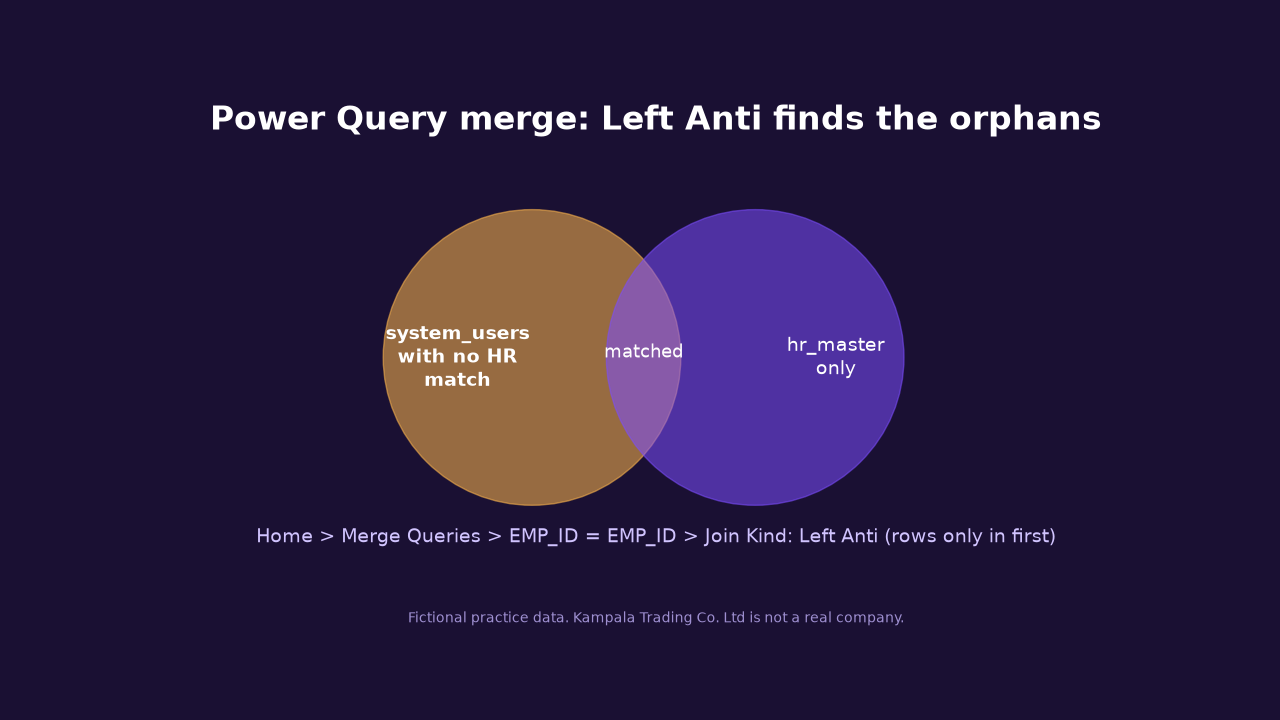
Power Query Left Anti join. Data > Get Data > Combine Queries > Merge. First table system_users, second hr_master, select EMP_ID in both, Join Kind Left Anti (rows only in first). The result is your orphan list, plus generic and service accounts with a blank EMP_ID, which you filter out. For near-duplicates, such as similar vendor names, tick Use fuzzy matching in the same dialog and start with a similarity threshold of 0.85. On older Excel, Microsoft's free Fuzzy Lookup Add-In does the same job.
C-06 Access requests and joiners
Objective. Access is granted only after approval, and every joiner has a request.
- In
tbl_access_requestsadd three flags. - In
tbl_hr_masteradd NO_REQUEST for 2025 joiners.
NO_APPROVAL:   =[@APPROVER_ID]=""
AFTER_GRANT:   =AND([@APPROVAL_DATE]<>"",[@APPROVAL_DATE]>[@ACCESS_GRANTED_DATE])
SELF_APPROVED: =AND([@APPROVER_ID]<>"",[@APPROVER_ID]=[@EMP_ID])
NO_REQUEST (hr): =AND([@HIRE_DATE]>=DATE(2025,1,1),COUNTIF(tbl_access_requests[EMP_ID],[@EMP_ID])=0)
Expect. Requests with no approver, approvals dated after access was granted, a few self-approvals, and joiners with no request.
C-07 Segregation of duties
Objective. No user holds both roles of a conflicting pair in sod_conflicts.
- New sheet SoD. In A2:
=UNIQUE(tbl_user_roles[USER_ID]). Older Excel: copy USER_ID and use Data > Remove Duplicates on the copy. - In B1 across, type each pair as text, e.g. R03+R02, R01+R02 (one column per row of sod_conflicts).
- In B2, fill right and down. In the last column, ANY_CONFLICT.
- PivotTable on the result: count users per pair.
B2:  =AND(COUNTIFS(tbl_user_roles[USER_ID],$A2,tbl_user_roles[ROLE_ID],LEFT(B$1,3))>0,
         COUNTIFS(tbl_user_roles[USER_ID],$A2,tbl_user_roles[ROLE_ID],RIGHT(B$1,3))>0)
ANY_CONFLICT: =OR(B2:L2)
Expect. Around forty users with a conflict, mostly create plus approve payments, vendor maintenance plus payment approval, and developer plus production deployment.
Document. Cross-reference SoD users with self-approved vouchers (A-02). That link is usually the root cause.
C-08 Change management
Objective. Changes are approved, tested and deployed by someone other than the developer.
- Add flags to
tbl_change_log. Emergency changes may deploy first; test them separately.
NO_APPROVAL:     =AND([@CHANGE_TYPE]<>"Emergency",[@APPROVER]="")
BEFORE_APPROVAL: =AND([@CHANGE_TYPE]<>"Emergency",[@APPROVAL_DATE]<>"",[@DEPLOYED_DATE]<[@APPROVAL_DATE])
NOT_TESTED:      =OR([@TEST_RESULT]="Not tested",[@TEST_RESULT]="Fail")
DEV_DEPLOYED:    =COUNTIFS(tbl_user_roles[USERNAME],[@DEPLOYED_BY],tbl_user_roles[ROLE_ID],"R15")>0
EMERG_UNAPPROVED:=AND([@CHANGE_TYPE]="Emergency",[@APPROVER]="")
Expect. Unapproved normal changes, deploys before approval, untested or failed changes in production, developer deployments and emergency changes never approved afterwards.
C-09 Backups
Objective. A successful backup every day for every system.
- PivotTable: Rows SYSTEM_NAME, Columns REC_STATUS, Values Count of JOB_ID.
- Calendar check: new sheet, A2
=SEQUENCE(365,1,DATE(2025,1,1)), system names across B1:F1, then the formula below. - Zero-size successes: SIZE_GB = 0.
MISSING (B2): =COUNTIFS(tbl_backup_log[SYSTEM_NAME],B$1,tbl_backup_log[BACKUP_DATE],$A2)=0
ZERO_SIZE:    =AND([@REC_STATUS]="Success",[@SIZE_GB]=0)
Expect. Failed and warning jobs, a few zero-size "successes" and missing days across systems.
C-10 Incidents and SLA
Objective. Tickets resolved within SLA and closed properly.
- Add HOURS and flags to
tbl_incident_tickets. Date plus time gives one datetime; multiply by 24 for hours.
HOURS:      =IF([@RESOLVED_DATE]="","",(([@RESOLVED_DATE]+[@RESOLVED_TIME])-([@OPENED_DATE]+[@OPENED_TIME]))*24)
SLA_BREACH: =AND([@HOURS]<>"",[@HOURS]>[@SLA_HOURS])
NO_NOTES:   =AND([@REC_STATUS]="Closed",[@RESOLUTION_NOTES]="")
OLD_OPEN:   =AND([@REC_STATUS]="Open",AsAt-[@OPENED_DATE]>30)
Expect. SLA breaches (pivot by PRIORITY), closed tickets with no notes or no resolved time, and old open tickets.
C-11 Admin log: out of hours and gaps
Objective. Sensitive admin actions are in hours and the log is complete.
- Add OUT_OF_HOURS to
tbl_admin_audit_log. WEEKDAY with type 2 makes Saturday 6 and Sunday 7. - Sort by LOG_ID ascending, add GAP. In a table, use INDEX on the previous row.
OUT_OF_HOURS: =AND(ISNUMBER(MATCH([@ACTION_TYPE],{"Create user","Reset password","Change role","Export data","Delete log","Disable audit"},0)),
                  [@USERNAME]<>"SVC_SCHED",
                  OR(WEEKDAY([@EVENT_DATE],2)>5,HOUR([@EVENT_TIME])<6,HOUR([@EVENT_TIME])>=20))
GAP (row 2 and down, LOG_ID in column A of the sheet):
              =IF(ROW()=2,0,A2-A1-1)
GENERIC_ADMIN:=COUNTIFS(tbl_system_users[USERNAME],[@USERNAME],tbl_system_users[ACCOUNT_TYPE],"Generic")>0
Expect. Out-of-hours sensitive actions (some are Delete log and Disable audit), actions by shared admin accounts, and missing log numbers including one large block.
C-12 Patching
Objective. Critical patches applied within 30 days; no unsupported systems.
- Add flags to
tbl_patch_status; pivot OVERDUE by CRITICALITY.
OVERDUE:   =AND([@PENDING_CRITICAL_PATCHES]>0,[@OLDEST_PENDING_RELEASED]<>"",AsAt-[@OLDEST_PENDING_RELEASED]>30)
EOL:       =[@OS_SUPPORT_STATUS]="End of life"
NO_SCAN:   =AsAt-[@LAST_SCAN_DATE]>90
NO_OWNER:  =[@OWNER_EMP_ID]=""
Expect. Overdue assets (a share of them High criticality), end-of-life systems, assets not scanned and assets with no owner.
Application control tests
A-01 Input validation
Objective. The system rejects incomplete or illogical vouchers.
- Flags on
tbl_transactions.
NO_DESC:    =[@DESCR_TEXT]=""
NO_VENDOR:  =AND([@VOUCHER_TYPE]="Payment",[@VENDOR_ID]="")
BAD_AMOUNT: =[@AMOUNT]<=0
FUTURE:     =[@CREATED_DATE]>AsAt
Expect. Blank descriptions, payments without a vendor, negative and zero amounts, and vouchers dated after year end.
A-02 Maker-checker and approval limits
Objective. Different maker and checker, approval after creation, within limit.
- Flags on
tbl_transactions. LIMIT comes fromtbl_approver_limits.
SELF_APPROVED: =AND([@APPROVED_BY]<>"",[@CREATED_BY]=[@APPROVED_BY])
NO_APPROVAL:   =[@APPROVED_BY]=""
APPR_BEFORE:   =AND([@APPROVED_DATE]<>"",[@APPROVED_DATE]+[@APPROVED_TIME]<[@CREATED_DATE]+[@CREATED_TIME])
LIMIT:         =XLOOKUP([@APPROVED_BY],tbl_approver_limits[USERNAME],tbl_approver_limits[APPROVAL_LIMIT],"")
  older Excel: =IFERROR(VLOOKUP([@APPROVED_BY],tbl_approver_limits,2,FALSE),"")
OVER_LIMIT:    =AND([@VOUCHER_TYPE]="Payment",[@LIMIT]<>"",[@AMOUNT]>[@LIMIT])
NEAR_LIMIT:    =AND([@AMOUNT]>=9500000,[@AMOUNT]<10000000)
Expect. Self-approvals by a small group of users, posted vouchers with no approval, approvals timed before creation, limit breaches and a cluster just under 10 million.
Document. PivotTable: Rows CREATED_BY, filter SELF_APPROVED = TRUE, Values Sum of AMOUNT. That is your exception value.
A-03 Duplicates, gaps, timing and round amounts
Objective. Find unusual payments the standard controls miss.
- Sort the table by VOUCHER_NO ascending before the GAP formula.
- Weekend means WEEKDAY(...,2) above 5.
DUP_PAY:   =AND([@VENDOR_ID]<>"",[@AMOUNT]>0,COUNTIFS([VENDOR_ID],[@VENDOR_ID],[AMOUNT],[@AMOUNT],[CREATED_DATE],[@CREATED_DATE])>1)
SEQ:       =VALUE(MID([@VOUCHER_NO],5,6))
GAP:       =IF(ROW()-ROW(tbl_transactions[#Headers])=1,0,[@SEQ]-INDEX([SEQ],ROW()-ROW(tbl_transactions[#Headers])-1)-1)
OFF_HOURS_LARGE: =AND([@AMOUNT]>=20000000,OR(WEEKDAY([@POSTING_DATE],2)>5,HOUR([@POSTING_TIME])<6,HOUR([@POSTING_TIME])>=20))
ROUND:     =AND([@AMOUNT]>=1000000,MOD([@AMOUNT],1000000)=0)
Expect. Duplicate pairs (both rows flagged), missing voucher numbers (sum the GAP column for the count; count rows with GAP above 0 for the number of gaps), large weekend or night postings and round amounts.
A-04 Benford first digit
Objective. Check whether amounts follow the natural first-digit pattern.
- Add FIRST_DIGIT to
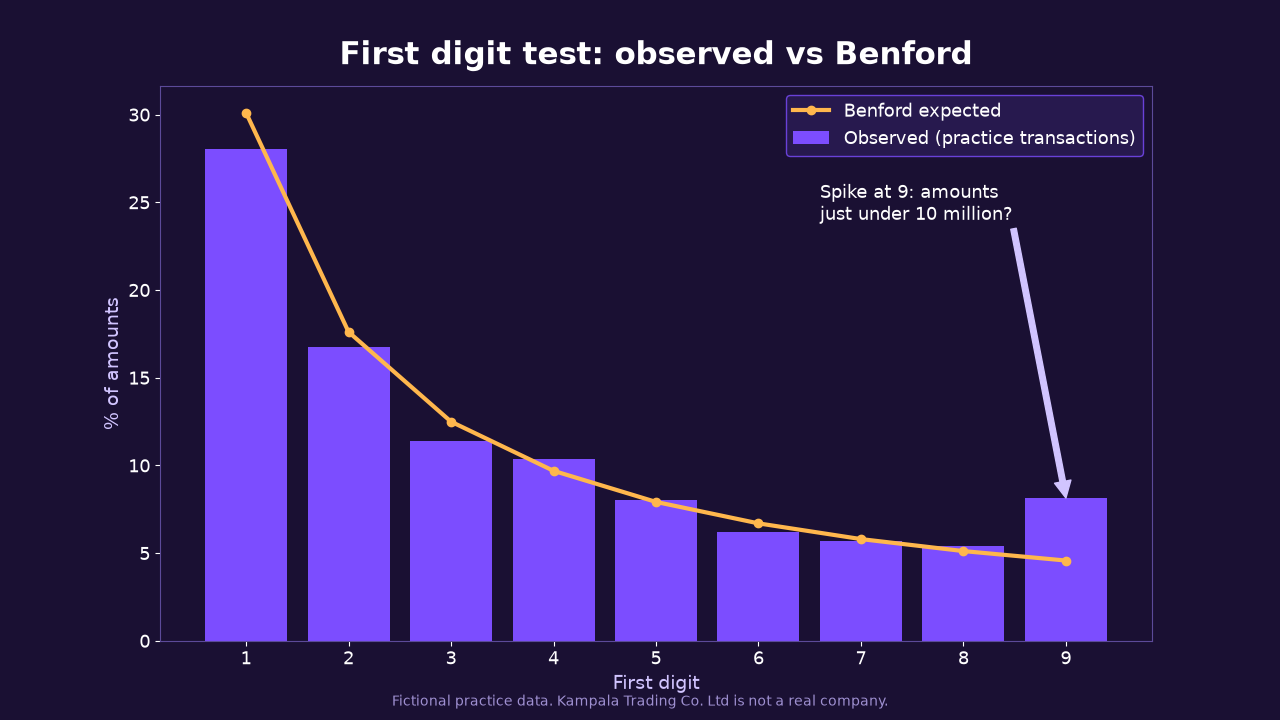
tbl_transactions. - On a new sheet, digits 1 to 9 in A2:A10, then observed and expected percentages. Chart them as a column and line chart.
FIRST_DIGIT: =IF([@AMOUNT]>0,VALUE(LEFT(TEXT([@AMOUNT],"0"),1)),"")
OBSERVED %:  =COUNTIF(tbl_transactions[FIRST_DIGIT],A2)/COUNT(tbl_transactions[FIRST_DIGIT])
EXPECTED %:  =LOG10(1+1/A2)
Expect. A visible spike at 9, which links to the near-limit cluster in A-02. Benford points you where to look. It proves nothing on its own.
A-05 Three-way match
Objective. Invoices match a PO and a GRN for quantity and price.
- Power Query option: merge invoices to purchase_orders on PO_NO (Inner), then to grn on PO_NO (Left Outer), expand the columns you need.
- Formula option, in
tbl_invoices:
GRN_QTY:      =XLOOKUP([@PO_NO],tbl_grn[PO_NO],tbl_grn[QTY_RECEIVED],"NO GRN")
PO_PRICE:     =XLOOKUP([@PO_NO],tbl_purchase_orders[PO_NO],tbl_purchase_orders[UNIT_PRICE],"")
PO_DATE:      =XLOOKUP([@PO_NO],tbl_purchase_orders[PO_NO],tbl_purchase_orders[PO_DATE],"")
NO_PO:        =[@PO_NO]=""
NO_GRN:       =AND([@PO_NO]<>"",[@GRN_QTY]="NO GRN")
QTY_OVER:     =AND(ISNUMBER([@GRN_QTY]),[@QTY_INVOICED]>[@GRN_QTY])
PRICE_DIFF:   =AND([@PO_PRICE]<>"",[@UNIT_PRICE]<>[@PO_PRICE])
BEFORE_PO:    =AND([@PO_DATE]<>"",[@INVOICE_DATE]<[@PO_DATE])
DUP_INVOICE:  =COUNTIFS([INVOICE_NO],[@INVOICE_NO],[VENDOR_ID],[@VENDOR_ID])>1
VAT_WRONG:    =ABS([@VAT_AMOUNT]-ROUND([@NET_AMOUNT]*0.18,0))>1
NET_WRONG:    =[@NET_AMOUNT]<>[@QTY_INVOICED]*[@UNIT_PRICE]
Expect. Invoices with no PO or no GRN, over-billed quantities, price differences, invoices before the PO, duplicates and VAT or arithmetic errors.
A-06 Payroll vs HR and recalculation
Objective. Only current employees are paid, correctly.
- Flags on
tbl_payroll. PAYE rules are in the data dictionary and are simplified for practice.
IN_HR:       =ISNUMBER(MATCH([@EMP_ID],tbl_hr_master[EMP_ID],0))
HR_STATUS:   =XLOOKUP([@EMP_ID],tbl_hr_master[EMP_ID],tbl_hr_master[EMP_STATUS],"NOT IN HR")
GHOST:       =NOT([@IN_HR])
PAID_LEAVER: =[@HR_STATUS]="Terminated"
GROSS_OK:    =[@GROSS_PAY]=[@BASIC_SALARY]+[@ALLOWANCES]
NET_OK:      =[@NET_PAY]=[@GROSS_PAY]-[@PAYE]-[@NSSF_EMPLOYEE]
SHARED_BANK: =COUNTIF([BANK_ACCOUNT],[@BANK_ACCOUNT])>1
BANK_VS_HR:  =AND([@IN_HR],XLOOKUP([@EMP_ID],tbl_hr_master[EMP_ID],tbl_hr_master[BANK_ACCOUNT])<>[@BANK_ACCOUNT])
Expect. A few ghosts, terminated staff still paid, shared bank accounts, bank accounts that differ from HR, and gross or net errors.
A-07 Vendor master changes
Objective. Bank detail changes are approved and are not followed straight away by payments.
- In
tbl_transactionsadd CREATED_DT; intbl_vendor_changesadd CHANGE_DT and the flags. Use date plus time; date alone overstates the matches. - In
tbl_vendors, match bank accounts to HR.
CREATED_DT (transactions): =[@CREATED_DATE]+[@CREATED_TIME]
CHANGE_DT  (changes):      =[@CHANGE_DATE]+[@CHANGE_TIME]
PAID_WITHIN_7: =AND([@FIELD_CHANGED]="Bank account",
  COUNTIFS(tbl_transactions[VENDOR_ID],[@VENDOR_ID],tbl_transactions[VOUCHER_TYPE],"Payment",
           tbl_transactions[CREATED_DT],">="&[@CHANGE_DT],tbl_transactions[CREATED_DT],"<="&[@CHANGE_DT]+7)>0)
NO_APPROVAL:   =[@APPROVED_BY]=""
EMPLOYEE_BANK (vendors): =COUNTIF(tbl_hr_master[BANK_ACCOUNT],[@BANK_ACCOUNT])>0
DUP_TIN (vendors):       =AND([@TIN]<>"",COUNTIF([TIN],[@TIN])>1)
Expect. Bank changes followed by a payment within a week, unapproved changes, vendors paid into employee accounts, and duplicate vendors by TIN.
A-08 GL vs subledger and control totals
Objective. Ledgers agree and the files are complete.
- Flag in
tbl_gl_vs_subledger, then pivot by ACCOUNT_AREA.
RECALC_DIFF: =[@GL_BALANCE]-[@SUBLEDGER_BALANCE]
BIG_DIFF:    =ABS([@RECALC_DIFF])>1000000
COUNT_OK (control_totals): =[@RECORD_COUNT]=ROWS(INDIRECT("tbl_"&SUBSTITUTE([@FILE_NAME],".csv","")))
Expect. A few large month-end differences and some small rounding ones. COUNT_OK should be TRUE for every file; if not, re-import before testing.
4. Reporting
Exception summary
| Ref | Test | Population | Exceptions | Value (UGX) | Rating |
|---|---|---|---|---|---|
| C-01 | Leavers still active | 120 leavers | your count | n/a | High |
| A-02 | Self-approved payments | 5,000 vouchers | your count | SUM of AMOUNT | High |
| A-05 | Invoices with no GRN | 825 invoices | your count | SUM of TOTAL_AMOUNT | High |
Always show the population beside the count.
Finding template
Ref and title:
Condition (what we found, count, value, period):
Criteria (policy or standard it breaks):
Cause (why it happened):
Effect (risk or impact):
Recommendation (specific, practical, owner):
Management response (agree/disagree, action, owner, date):
Working paper reference: e.g. WP C-01, sheet system_users, column LEAVER_ACTIVE
Evidence and working papers
- One sheet per test, named with the WP reference. Show formulas with Formulas > Show Formulas and take a screenshot for the file.
- Keep the pivot that gives each count, and a FILTER or copy of the exception rows.
- Record the source file name, record count and control total check on the Tests sheet.
- When done: save a copy, protect the sheets (Review > Protect Sheet), and keep the originals read-only.
Excel vs CAATs
| Issue | Excel | IDEA and other CAATs |
|---|---|---|
| Audit trail | None by default; you must document every step | History logs every step |
| Data integrity | Easy to type over or sort one column | Source data is read-only |
| Volume | About 1 million rows per sheet; slow with heavy formulas | Built for large files (Education edition limit 5,000 records) |
| Repeatability | Depends on your notes | Scripts and history can be rerun |
Excel is fine if you protect the evidence. Lock the originals, never sort a single column, and write down every step.
5. Activities and reflection
This is the practical part. Do it in Excel only, so you learn what the tool can and cannot do.
- Download the starter workbook or the datasets above, and complete the completeness checks against control_totals.
- Complete at least six tests: C-01, C-04, C-07, A-02, A-05, and one of your choice. Record each on the Tests sheet.
- Post your results as one comment using the template below.
- Upload your workbook (and a short PDF write-up if you like) using the Submit box on this page. Allowed: .xlsx, .xls, .csv, .pdf, .docx, .zip, up to 3 files of 20 MB each.
- Reply to at least two other IT auditors' comments with a critique.
EXCEL AUDIT RESULTS
Name and programme/year:
Tests completed (refs):
For each test:
- Objective:
- Table and helper formula used:
- Population / exceptions / value:
- Two example IDs:
- Risk rating and why:
- Recommendation:
Limitations of doing this in Excel:
Reflection (what surprised me, what went wrong, what I learnt):
Critique template.
Submission reviewed:
Formula correct? (which one, and why)
Count plausible for the population?
Rating justified?
Recommendation practical?
One suggestion:
Be specific and kind, refer to a test and a number, and do not copy anyone's formulas or wording. Exception counts will be checked against the answer key. Commenting and submitting need you to be signed in (Continue with Google, or email) with a complete profile.
Reflection prompts. Which test was hardest to get right in Excel, and why? Where did a formula give a wrong answer before you fixed it? Which finding would you raise first with the Finance Manager?
Rubric
| Criterion | Full marks | Weight |
|---|---|---|
| Formula accuracy | Correct helper formulas and counts that match the data | 30 |
| Working papers | Clear Tests sheet, WP references, evidence of completeness checks | 20 |
| Risk judgement and findings | Justified ratings, practical recommendations | 20 |
| Peer critique | Two or more specific, useful replies | 20 |
| Reflection | Honest and specific | 10 |
| Total | 100 |
Submit when you are ready; there is no due date.