The first time I left a fresh Ubuntu cloud VM open on the public internet with password SSH still enabled, the auth log filled with failed logins before I finished my tea. That was not a movie plot. It was a small consulting job in Kampala, a client who needed a staging box for a week, and me who thought "I will harden it after lunch." By lunch the scanners had already found port 22.
I teach the same lesson in my Unix and Information Security labs at Makerere University Business School (MUBS) Applied Computing & IT, and when I guest on networking and security modules at Nkumba. Students often ask for "the five things that actually matter" before they get lost in CIS benchmarks the size of a phone book. This article is that list, written the way I run it on client servers and the way I mark it in class: SSH first, firewall second, Fail2ban third, kernel knobs fourth, patching fifth. Do them in order. Verify each step before you move on.
If a service later goes down on a hardened host, do not jump straight to systemctl restart. Read the process, the port, and the log first. I wrote that routine separately in Linux service down? Check the process, port, and logs first.
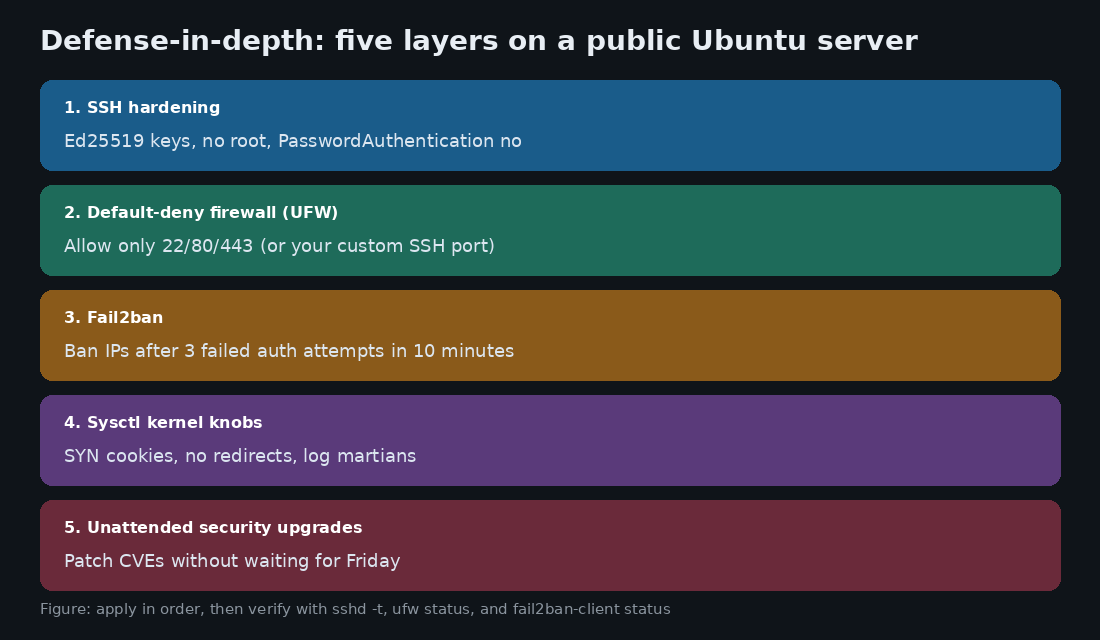
1. Disable root login and enforce Ed25519 key authentication
Password SSH is how most of the noise in /var/log/auth.log starts. Credential stuffing does not need a clever attacker. It needs a default username and a weak password on a box that answers on port 22. On every new Ubuntu or Debian server I touch, the first sitting is: generate a modern key, install the public key, then turn passwords off.
On your laptop (not on the server):
# Generate an Ed25519 key if you do not already have one
ssh-keygen -t ed25519 -a 100 -C "samuel@mubs-laptop"

# Copy the public key (replace user and host)
ssh-copy-id -i ~/.ssh/id_ed25519.pub deploy@YOUR_SERVER_IP
Then create a drop-in config so a package upgrade does not silently overwrite your hardening. On Ubuntu this is cleaner than editing the whole sshd_config:
sudo mkdir -p /etc/ssh/sshd_config.d
sudo tee /etc/ssh/sshd_config.d/99-hardening.conf <<'EOF'
# Disable root login entirely
PermitRootLogin no

# Public key only
PasswordAuthentication no
KbdInteractiveAuthentication no
PubkeyAuthentication yes
AuthenticationMethods publickey

# Idle sessions die after ~10 minutes of silence
ClientAliveInterval 300
ClientAliveCountMax 2

# Fewer guesses per connection
MaxAuthTries 3

# Optional but useful: only your admin group
# AllowGroups sshusers
EOF
Test before you restart. Always keep the current SSH session open and open a second terminal to prove the new config works:
sudo sshd -t
sudo systemctl reload ssh
# from a second window:
ssh -i ~/.ssh/id_ed25519 deploy@YOUR_SERVER_IP
The OpenSSH manual pages document these knobs clearly; start with sshd_config(5) on Ubuntu when a student asks "where is this written down?" In class I also fail students who lock themselves out and then ask me to open the cloud console. Leave a break-glass session until the second login succeeds.
2. Configure a strict default-deny firewall (UFW)
A new Ubuntu server often accepts inbound traffic on every port. That is fine on a closed lab VLAN. It is reckless on a VPS with a public IPv4 address. I use Uncomplicated Firewall (UFW) because students can read the rules in one screen, and because ufw status verbose is easy to screenshot into an audit working paper.
sudo ufw default deny incoming
sudo ufw default allow outgoing

# Allow SSH BEFORE you enable the firewall
sudo ufw allow OpenSSH comment 'SSH'
# or a custom port:
# sudo ufw allow 2222/tcp comment 'SSH custom'

sudo ufw allow 80/tcp comment 'HTTP'
sudo ufw allow 443/tcp comment 'HTTPS'

sudo ufw enable
sudo ufw status verbose
Common classroom mistake: enable UFW before allowing SSH, then wonder why the session dies. If you changed the SSH port in sshd_config, the UFW rule must match that port. For more on how auditors expect evidence of firewall controls, see my series starting with What Is an IT and IS Audit? and the fieldwork piece on Phase 2: Fieldwork, Evidence and Tools.
3. Deploy Fail2ban to ban brute-force offenders
Even with passwords off, bots still hammer SSH. They waste CPU, fill logs, and make real failures harder to spot. Fail2ban watches the auth log and inserts temporary block rules. I install it on every public SSH host I manage.
sudo apt update
sudo apt install fail2ban -y
sudo cp /etc/fail2ban/jail.conf /etc/fail2ban/jail.local
Edit the [sshd] section in /etc/fail2ban/jail.local (or create /etc/fail2ban/jail.d/sshd.local):
[sshd]
enabled = true
port = ssh
filter = sshd
backend = systemd
maxretry = 3
findtime = 600
bantime = 86400
Three failures inside ten minutes earns a 24-hour ban. Reload and check:
sudo systemctl enable --now fail2ban
sudo fail2ban-client status sshd
On one Nkumba lab afternoon we pointed a throwaway VM at the class projector and watched Fail2ban fill its ban list within minutes. Students remember that demo longer than any slide about "defense in depth."
4. Kernel parameter hardening via sysctl
These settings will not stop a stolen password. They do blunt common network abuse: SYN floods, ICMP redirect tricks, and source-routed packets. Create /etc/sysctl.d/99-security.conf:
# SYN cookies help under SYN flood pressure
net.ipv4.tcp_syncookies = 1

# Ignore broadcast pings
net.ipv4.icmp_echo_ignore_broadcasts = 1

# This host is not a router (set to 1 only if it truly forwards)
net.ipv4.ip_forward = 0

# Do not accept ICMP redirects (MITM route poisoning)
net.ipv4.conf.all.accept_redirects = 0
net.ipv4.conf.default.accept_redirects = 0
net.ipv6.conf.all.accept_redirects = 0
net.ipv6.conf.default.accept_redirects = 0

# Do not accept source-routed packets
net.ipv4.conf.all.accept_source_route = 0
net.ipv6.conf.all.accept_source_route = 0

# Log clearly bogus (martian) addresses
net.ipv4.conf.all.log_martians = 1

# Mitigate TIME-WAIT assassination weirdness
net.ipv4.tcp_rfc1337 = 1
Apply immediately:
sudo sysctl --system
# spot-check one value
sysctl net.ipv4.tcp_syncookies
I tell consulting clients the same thing I tell students: if this machine is a router or VPN gateway, do not blindly copy ip_forward = 0. Hardening is not a paste of someone else's file. It is a checklist you understand.
5. Automated security updates (unattended-upgrades)
Most breaches I read about in local post-mortems are not zero-days. They are known CVEs that sat unpatched while someone waited for a quiet Friday. On Ubuntu, enable unattended security updates:
sudo apt install unattended-upgrades apt-listchanges -y
sudo dpkg-reconfigure -plow unattended-upgrades
Confirm the security pocket is enabled in /etc/apt/apt.conf.d/50unattended-upgrades, then check status:
sudo systemctl status unattended-upgrades
# recent automatic upgrade activity
sudo journalctl -u unattended-upgrades -n 40 --no-pager
For production that must not reboot alone, leave automatic reboots off and schedule a maintenance window. For a lonely staging VM that nobody wants to babysit, automatic security upgrades are the difference between "we patched" and "we hoped."
A short verification script I run before I leave the site
After the five steps, I run a quick checklist and paste the output into the handoff notes:
echo "=== sshd ===" && sudo sshd -t && echo OK
echo "=== ufw ===" && sudo ufw status verbose
echo "=== fail2ban ===" && sudo fail2ban-client status sshd
echo "=== syncookies ===" && sysctl net.ipv4.tcp_syncookies
echo "=== unattended ===" && systemctl is-active unattended-upgrades
Optional deeper score: sudo apt install lynis -y && sudo lynis audit system. Treat Lynis as a teacher, not a judge. Fix the high-impact items first.
What I still see go wrong in Kampala labs and client sites
Hardening SSH, then locking the only admin out with no second session and no cloud console plan.
UFW allowing port 22 while sshd listens on 2222 (or the reverse).
Fail2ban installed but never enabled, so
systemctl statusshows inactive and nobody noticed.Copy-pasting sysctl from a router guide onto an app server, or the opposite.
Disabling password auth before the public key is in
~/.ssh/authorized_keyswith the right permissions (700on.ssh,600on the key file).
Key takeaways
On any public Ubuntu or Debian host, turn off password SSH and root login before you install the application stack.
Default-deny with UFW, then open only what the service needs. Match the SSH port exactly.
Fail2ban cuts the noise so real incidents stand out in the logs.
Sysctl and unattended upgrades are boring. Boring is good. Most compromises exploit the boring gaps.
When something breaks later, use the service-down checklist before you restart and erase the evidence.
Hardening is not a one-hour badge. It is the baseline I expect before a student calls a machine "production" and before I sign off a consulting handoff. Do these five steps, keep the proof, and then build the app on top of a quieter, smaller attack surface.