
WHAT IS A COMPUTER NETWORK?
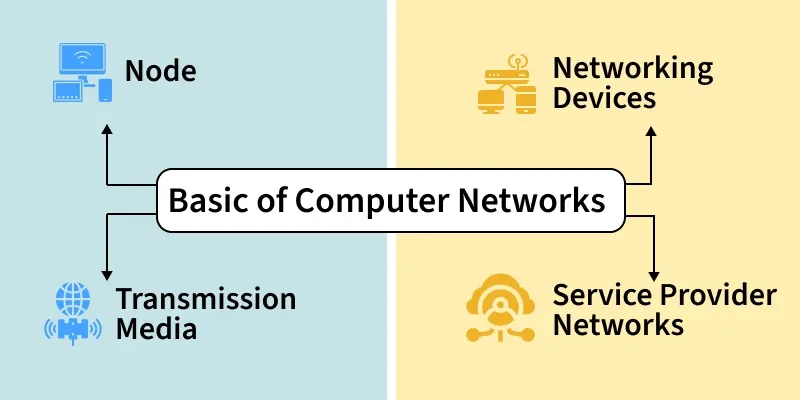
A computer network is a group of connected devices that communicate with each other to share data and resources. It enables efficient communication and supports services such as file sharing, email, printing, and internet access. Think of the way MTN Uganda connects millions of phones across the country so that people can call, send messages, and use mobile data. A computer network inside an organisation works on the same principle, but typically within buildings and offices.
Networks exist so that organisations do not have to duplicate resources. Instead of buying a printer for every desk at Stanbic Bank Uganda, one shared network printer can serve an entire branch. Instead of copying files on USB drives, a file server on the network makes documents available to everyone instantly. At Makerere University Business School, staff and students share internet access, file servers, and printers through the campus network, all made possible by the same basic principles you will learn in this course.
- Nodes are devices such as computers, mobiles, or printers that exchange data.
- Routers and switches control and direct the flow of information.
- Transmission media carries data between devices.
- Wired media includes Ethernet and optical fiber cables.
- Wireless media includes Wi-Fi, Bluetooth, and infrared.
How a Computer Network Works
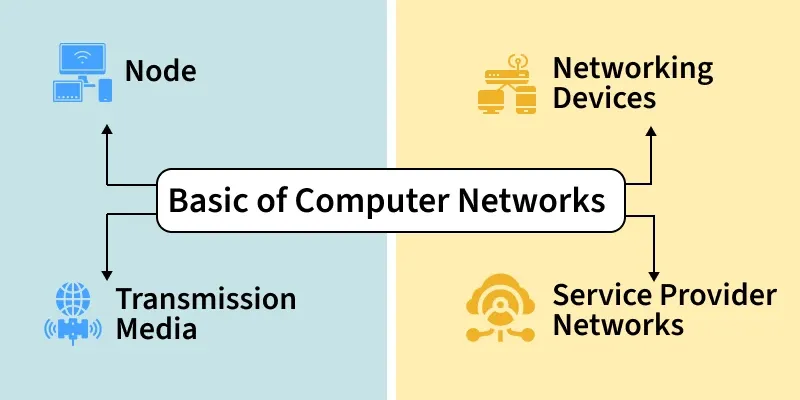
A network consists of nodes such as computers, servers, routers, and switches that send or receive data. These nodes are connected through links, which may be wired (such as UTP cables and optical fibre) or wireless (such as Wi-Fi and radio signals). When data is sent from one device to another, it is broken into small units called packets and transmitted across the network. Each device is identified by a unique IP address, which ensures that data reaches the correct destination and not the wrong device.
Network devices such as switches and routers receive these packets and forward them along the correct path. Security mechanisms such as firewalls monitor traffic and allow or block data based on rules set by the network administrator.
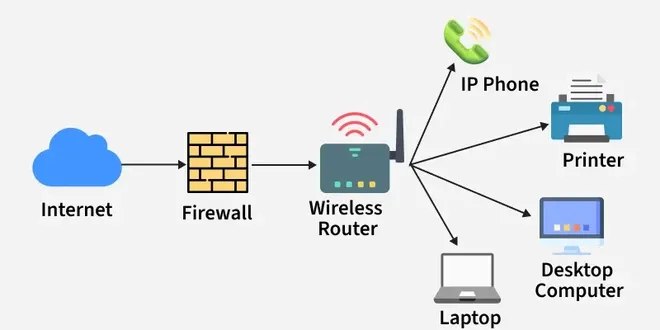
- A network consists of nodes such as computers, servers, routers, and switches that send or receive data.
- These nodes are connected through links, which may be wired (cables, optical fiber) or wireless (Wi-Fi, radio signals).
- When data is sent, it is broken into small packets and transmitted across the network.
- Protocols define how data packets are formatted, transmitted, received, and acknowledged.
- Each device is identified by a unique IP address, which ensures data reaches the correct destination.
- Network devices like switches and routers forward data packets along the best available path.
- Security mechanisms, such as firewalls, monitor traffic and allow or block data based on security rules.
- Key Definition: Computer Network — Two or more devices connected together to communicate and share resources.
- Key Definition: Node — Any device connected to a network. Examples include a PC, laptop, printer, server, and IP phone.
- Key Definition: Packet — A small unit of data that is sent across a network. Large files are broken into many packets, sent separately, and reassembled at the destination.
- Key Definition: IP Address — A unique numerical label assigned to every device on a network, used to identify and locate that device. For example, 192.168.1.10.
Types of Computer Network Architecture
Networks can be designed in two main ways.
In Client-Server Architecture, there are dedicated server computers that provide services and client computers that request and use those services. The server manages and controls what clients can access. This is the architecture used in your Packet Tracer labs: the Server-PT device at each branch acts as the file server, and the PCs and laptops are the clients.
In Peer-to-Peer (P2P) Architecture, there is no central server. Every device can act as both a client and a server. Small home networks and simple file-sharing setups often use peer-to-peer architecture.
Network Devices
1. Router
A router connects two or more different networks and routes data between them. It uses IP addresses to determine the best path for data packets and forwards them accordingly. Routers are what connect a local office network to the internet. In Uganda, when MTN provides a business internet connection, a router at the customer’s premises connects the local office network to MTN’s wider network. In your Packet Tracer labs for this course, there is no router yet. This is why devices at different branches cannot communicate with each other across the network.
- Connects local networks to the internet
- Determines the best path for data packets
- Uses IP addresses to forward data correctly
2. Switch
A switch connects devices within the same network and manages internal data communication. It connects computers, printers, and servers within one office or building. Importantly, it sends data only to the intended destination device rather than broadcasting to everyone. This makes it more efficient and more secure than a hub. In every Packet Tracer lab in this course, you use the Cisco Catalyst 2960-24TT switch as the central intermediary device for each branch.
- Connects computers, printers, and servers
- Sends data only to the intended device
- Improves network efficiency and performance
3. Hub
A hub is an older and simpler device that connects multiple devices but broadcasts every message out of all its ports to all connected devices, regardless of who the intended recipient is. It does not filter or manage traffic. This makes hubs less secure and less efficient than switches. Hubs are obsolete and no longer used in modern networks. They have been completely replaced by switches.
- Broadcasts data to all connected devices
- Does not filter or manage traffic
- Less secure and less efficient than a switch
4. Bridge
A Bridge connects two network segments and filters traffic between them.
- Reduces unnecessary data transmission
- Improves network performance
- Works using MAC addresses
5. Gateway
A Gateway connects two different networks that use different protocols.
- Translates data between different systems
- Enables communication between dissimilar networks
- Commonly used to connect private networks to external networks
6. Access Point (AP)
A wireless access point extends a wired network into a Wi-Fi zone, allowing mobile devices such as laptops, tablets, and smartphones to connect wirelessly. Many offices and university campuses in Uganda, including MUBS, use wireless access points so that staff and students can connect their devices without a cable.
- Extends a wired network into Wi-Fi
- Allows mobile devices to connect wirelessly
- Improves network coverage area
7. Modem
A modem converts digital data from your computer into a signal that can travel over a telephone line or cable, and converts incoming signals back into digital data. It connects a home or office to the Internet Service Provider (ISP). In Uganda, modems are used to connect offices to ISPs such as MTN, Airtel, or Liquid Telecom.
- Connects a home or office network to the ISP
- Converts digital signals to analog and back
- Enables internet access
8. Firewall
A firewall is a security device that monitors and controls network traffic, blocking unauthorised access and filtering incoming and outgoing data to protect the network from cyber threats. In institutions like MUBS and banks such as Stanbic Bank Uganda, firewalls are essential to protect sensitive data.
- Blocks unauthorized access
- Filters incoming and outgoing data
- Protects networks from cyber threats
Goals and Uses of Computer Networks
- Communication and Collaboration: Enable communication through email, messaging, video conferencing, and collaborative platforms.
- Resource Sharing: Allow multiple users to share hardware, software, and data resources efficiently.
- Data Access and Sharing: Provide easy access to stored data and allow information exchange between users and systems.
- Internet and Cloud Access: Enable access to the Internet, online services, and cloud-based applications.
- Cost Efficiency: Reduce operational and infrastructure costs through shared resources and centralized systems.
- Reliability and Availability: Improve system reliability using backup paths and fault-tolerant mechanisms.
- Scalability and Growth: Support easy expansion by adding new devices and services as demand increases.
- Security and Control: Protect data and network resources using authentication, access control, and monitoring.
Summary
A computer network connects devices so they can communicate and share resources. End devices such as PCs, laptops, servers, printers, and IP phones are the sources and destinations of data. Intermediary devices such as switches, routers, hubs, access points, and firewalls move and manage that data. The switch is the most important intermediary device in your Packet Tracer labs for this course.
Ugandan Example: At Nile Basin Trading Company, the PCs, laptops, servers, printers, and IP phones at both the Mbarara and Jinja branches are the end devices. The Cisco Catalyst 2960-24TT switch at each branch is the intermediary device that connects all those end devices together and ensures data reaches the correct destination.


3 Comments
🙏
Good
It has been wonderful